

Release the Locusts! Using Locust for load testing websites
A tool I find myself using more and more over the last year is called Locust, which is a python application geared at load testing websites. With a few simple commands you can create a repeatable test that you can scale at will, up to thousands of emulated users, and with lots of pathing and configuration options to meet your needs!
Installing Locust is easy enough following their instructions online. Once it’s set up you’ll want to create a locustfile.py, which defines the behaviour for one of your users.
from locust import HttpUser, task

class HelloWorldUser(HttpUser):
    @task
    def hello_world(self):
        self.client.get("/ping")
This is all you need to get started with Locust. Once you’ve got your file created you can call locust in the same folder and it will launch a local web server, running on port 8089 by default.
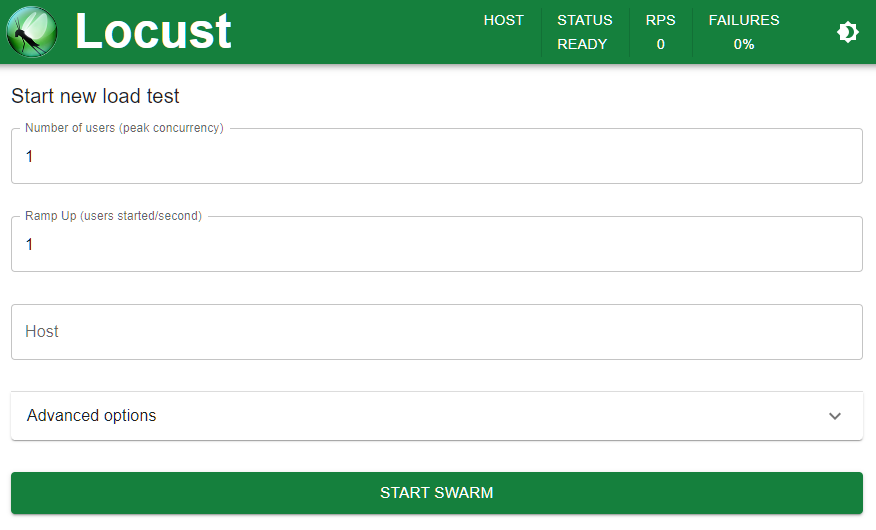
As you can see, once you log into the web UI you can specify a few things - peak concurrency (the number of users hitting those endpoints at the same time), the ramp up time (how quickly you want to increase the traffic up to that max user count), and the domain you’d like to execute those tests against. Easy as that!
Once you’ve entered your options, you can hit Start Swarm and you’ll be presented with a nice table of progress. Of course, the charts look much more impressive:
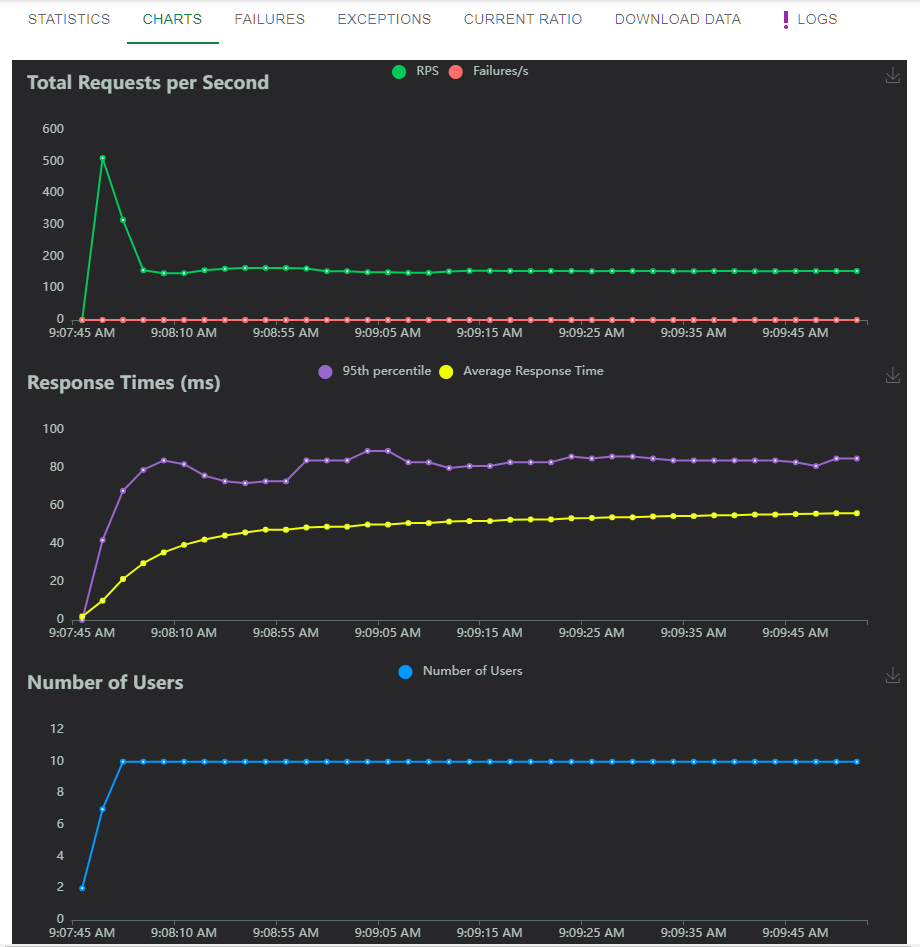
You may notice that despite only specifying 10 simultaneous users, we’re seeing request counts in the 150s - this is because each user will complete their task as often as possible, starting a new web request as soon as the original one finishes. You can add a delay to the locustfile.py - see the notes below
But that’s just the beginning! First off, although the web interface is nice for manual load testing, there’s also a command line option. Doing the same 10 user test, ramp up of 1 per second, over 60 seconds on the command line:
locust --headless --users 10 --spawn-rate 1 -H http://your-server.com -t 60s
With this command line approach you get constant updates to the console, eventually ending with a summary like so:
Response time percentiles (approximated)
Type     Name   50%    66%    75%    80%    90%    95%    98%    99%  99.9% 99.99%   100% # reqs
--------|----------|------|------|------|------|------|------|------|------|------|------|------
GET      /ping           58     61     63     64     67     70     74     78     89     97    100  11213
--------|----------|------|------|------|------|------|------|------|------|------|------|------
         Aggregated      58     61     63     64     67     70     74     78     89     97    100  11213
You can also request this data in CSV or JSON format to be more easily parsed by any automated tools like build processes you may want to incorporate load testing into.
Locust also supports a distributed worker scenario out of the box, where you can use a master node to coordinate worker nodes on different systems, simulating your web site getting hit from physically different locations if you had the infrastructure set up to do so.
The part I’m more excited about is the locustfile, the python file that you use to describe what a locust “task” looks like. Besides the fact that it’s just a regular python class, meaning you can execute pretty much whatever code you want in it, it also supports multiple task definitions and multiple user classes, each with their own “weights” to control how often those things are randomly picked in your test suite.
from locust import HttpUser, task, between

class MyUser(HttpUser):
    wait_time = between(5, 15)

    @task(4)
    def index(self):
        #sets auth cookie
        response = self.client.post("/login", {"username":"testuser", "password":"secret"})
        response = self.client.get("/profile")

    @task(1)
    def about(self):
        self.client.get("/about")
This class, for example, will spawn calls to the profile task (“/login” followed by “/profile”) 4 times more often than calls to about (“/about/”), with a random wait between 5 and 15 seconds each request. So much flexibility with so little code!
There’s probably 10 more blog posts I could make about Locust and locustfiles, but instead I’ll redirect you to the documentation. Happy testing!